Detailed info on using the new features of
versions 6.0 and 6.2
Upgrades
to Metro 6 for available now!
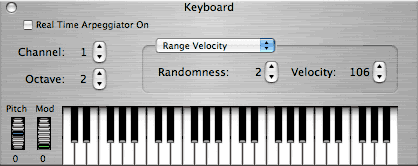
The keyboard
window allows direct entry from the mac Keyboard or mouse and also
expands to reveal an advanced
arpeggiator under the hood. Great for using your MacBook to control
AudioUnit (AU) or VST software synthesizers.
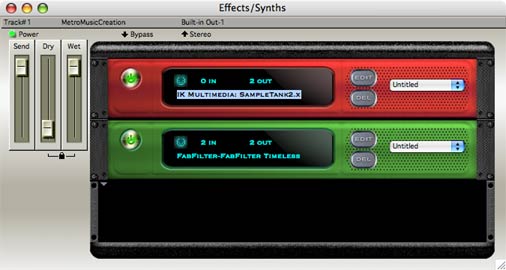
Sampler followed by Delay in an
effects rack on track 1
- Support for OS X
CoreAudio and CoreMIDI technology including the Audio MIDI Setup
application.
- AudioUnit V1 and V2 plug-in support.
- Support for AudioUnit Synthesizers including
Apple's built-in DLS/SoundFont II. Easily select any compatible
SoundFont. Program names generated automatically.
- Convert AudioUnit synthesizers to audio by
mixing tracks.
- Real-Time audio play-through.
- Mapping of MIDI controllers to effects
parameters for real time control.
- Optional floating transport window.
- High quality font support.

VST is a trademark of Steinberg
Soft- und Hardware GmbH
- Support for audio sample rates greater than 48k
such as 88.2k and 96k Hz.
- Support for bit sizes greater than 16 such as
24 and 32 and 32 bit float.
- Pitch Time stretch via Scale time and Transpose
to modify audio. Also option-drag regions to time stretch audio.
- Re-sampling via Scale Time.
- Improved Tempo changing with audio. Audio
regions now maintain there start times when tempos are changed.
- Define silence and remove silence of audio.
- Support for reading Cubase VST plug-in effect
programs (.fxp files) and banks (.fxb files).
- Greatly improved support for loading of effects
stored in documents on different computers.
- Effect editor windows added to the windows menu.
- Enhanced plug-in window with field sorting and
contextual menu popup.
- Much larger number of effects automation
parameters can be edited and in-use automation parameters are flagged
with an asterisk.
- Automate built-in effect send, dry and wet
faders.
- Mix audio tracks to 16, 24 bit or 32 bit float
and sample rates of 44k, 48k, 88k or 96k respectively.
- New Aux Fader VU meters.
- New Aux pan knobs.
- Jukebox allows loading of multiple audio files.
- Play all supported file types through effects
(via aux buss) and out to ASIO or built-in device.
- Supported audio types include MP3, MP4, Apple
Lossless, AIF, WAV, OGGV, compressed files and many more.
- Load songs by selecting folders and save lists
of songs as presets.
- Easily search for Artist or Song using partial
words.
- Complete support for reading and writing ID3
tags.
- Batch convert multiple files to AIF, WAV, MP3*,
MP4, Apple Lossless, Ogg Vorbis or any of many other formats. *requires LAME converter available separately.
- Intelligent shuffle.
- Auto-size different fields or manually drag
them.
- Drag files to exact time location in song by
dropping them either the graphic editor or tracks window. This feature
makes the jukebox double as an audio library.
- Independent font and size enables using the
jukebox as a stereo component device. (Infrared remote, not included).
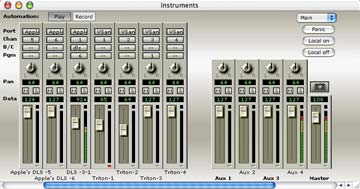
- New tracks overview with note and controller
representation plus independent x,y zoom control.
- New setup-tracks which are special MIDI tracks
that only play once to setup your synthesizers. Usually used with Sysex.
- MIDI thru All feature sends all channels
straight thru to a different synthesizer.
- Improved Remote Control. The ability to map
controllers and controller ranges.
- New remote control presets.
- Improved Rhythm Explorer™ arpeggiator
algorithms and phrase arpeggiator algorithm.
- Save all program name lists assigned to a given
MIDI port as a .ins file.
- Insert all possible bank select messages from
Event Editor.
- The ability to record some synthesizers (such
as the Korg Triton) arpeggiators when not in sequencer mode by pressing
play after record in external sync mode.
- Play while step recording option.
- QuickTime Musical Instruments now built-in.
- Expanding of loops now works for full track
loops MIDI and Audio.
- Live scrolling via proportional scroll thumbs.
- New Master Fader VU meter.
- New Golden Style.
- Improved styles.
- Support for Propellerheads Rewire.
- Support for ASIO-compatible audio cards
- Automated real-time effects processing
- 8 stereo aux busses for routing real-time
effects
- Drag-and-drop editing of audio
- Audio file compression
- VU meters for monitoring of audio and MIDI
- Audio scrubbing
- Crossfades with linear and exponential curves
- Multiple color schemes
- Context-sensitive, searchable Online Help
- Online tutorials
- Multitrack Digital Audio Record up to 64 tracks
of digital audio
- Record at variable sampling rates from up to 48
kHz (96kHz and 24 or 32 bit in Version 6).
- Edit and process with sample accuracy and
off-line edits
- Apply effects for real-time processing and
off-line edits
- Includes Audio Effects
- Drag and drop editing of audio regions
- Normalize, reverse, fade, audio
- Crossfade with linear and exponential curves
- Scale amplitude
- Merge audio (Combine)
- Real-time mixing
- Stereo mix-downs
- Multitrack MIDI Up to 99 tracks of MIDI per
section, up to 32 sections per song file
- Step record, punch in-out, loop record, sound
on sound record, and multi-take record
- Flexible pattern-based sequencing
- Edit notes, controllers, tempo, pitch bend and
drum patterns within a single window
- Real time arpeggiator for streaming and
arpeggio patterns
- Fade, cross-fade and automate volume, pan and
other data
- Quantize, Groove Quantize, and Humanize
- Pitch, bend and transpose notes
- Drum grid editing
- Criteria-based editing
- Record, edit SysEx data
- Multiple time/key signatures per song
- Velocity editing
- Edit and print notation (Convert MIDI tracks
into notation)
- Transcribe a MIDI performance or enter notes
with a mouse
- Print scores with titles, expression text,
dynamic markings and scalable staves
- Compose for film, video and QuickTime movies
- Sync MIDI tracks to SMPTE/MTC timecode for
scoring to film and video
- Import and export audio to and from QuickTime
movies
- Experiment and apply different rhythms in
real-time with the Rhythmic Explorer™
- Paint a musical canvas with the Note Spray™
tool.
- Add more effects when needed with Adobe
Premiere and VST-compatible audio plug-ins
Many Other features not listed here!
|